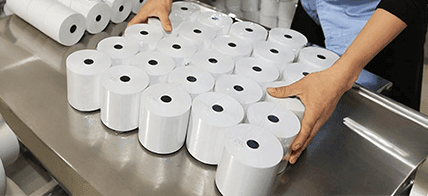
For Amazon FBA sellers, thermal shipping labels are not just a logistics necessity — they are a compliance requirement. Amazon's fulfillment centers process millions of packages daily, and labels that fail to scan, peel prematurely, or use non-compliant formats can result in shipment rejection, additional fees, or account suspension. This guide covers everything FBA sellers need to know about thermal label specifications, printer compatibility, and bulk sourcing.
Amazon FBA Label Requirements: The Basics
Amazon requires all FBA shipments to use specific label formats depending on the label type. Shipping labels (carrier labels) must be 4 inches x 6 inches (4x6) — this is the universal standard for US domestic shipping labels used by UPS, FedEx, USPS, and Amazon Logistics. FNSKU product labels must be 1x2 inches or 2x1 inches, printed with a scannable barcode and product title.
All barcodes on Amazon FBA labels must be printed at a minimum resolution of 203 DPI (dots per inch), with 300 DPI recommended for smaller barcodes. Barcodes must be scannable by Amazon's automated scanning systems — labels that fail to scan at the receiving dock will be flagged for manual processing, incurring additional fees.
Amazon prohibits the use of inkjet-printed labels for FBA shipments, as inkjet ink can smear or fade during transit. Direct thermal labels (no ribbon required) or thermal transfer labels are the required formats. Direct thermal is suitable for short-term use (labels that will be scanned within weeks); thermal transfer is recommended for labels that must remain legible for months.
Choosing the Right 4x6 Thermal Label
Not all 4x6 thermal labels are equal. For Amazon FBA shipping labels, the key specifications are: label material (direct thermal paper or thermal transfer paper), adhesive type (permanent or removable), core size (1 inch or 3 inch, depending on your printer), and label gap (gap between labels on the roll, typically 3mm for standard printers).
For most FBA sellers using desktop label printers (Zebra GX430t, ZD420, or similar), 4x6 direct thermal labels on a 1-inch core are the standard choice. These labels work without a ribbon, reducing consumable costs and printer maintenance. The adhesive should be a permanent acrylic adhesive that bonds reliably to cardboard, poly mailer, and bubble wrap surfaces.
If you store inventory in a temperature-controlled warehouse or ship to cold climates, consider a cold-temperature adhesive that maintains bond strength at temperatures down to -20°C. Standard adhesives can fail at low temperatures, causing labels to detach during transit.
Zebra Printer Compatibility: What You Need to Know
Zebra Technologies is the dominant brand in FBA label printing, with the GX430t, ZD420, ZD621, and ZT230 being the most common models in Amazon seller warehouses. These printers use ZPL (Zebra Programming Language) to format and print labels, and are pre-configured for 4x6 label stock.
When sourcing thermal labels for Zebra printers, verify: core size (1 inch for desktop models, 3 inch for industrial models), label gap detection method (gap sensing or black mark), and label stock sensitivity (Zebra printers are calibrated for medium-sensitivity thermal paper). Using labels with incorrect sensitivity can result in faded or overexposed prints.
Zhixin Paper label constructions are qualified against the exact printer model, core, roll OD, sensing method, media path, settings, and approved sample. Request a project-specific sample plan to test fit, feeding, print density, and barcode readability before a bulk order.
GS1-128 Barcode Standards for FBA
Amazon's shipping labels use GS1-128 barcodes (formerly known as UCC/EAN-128) to encode shipment and tracking information. GS1-128 is an international barcode standard used by Amazon, UPS, FedEx, and all major logistics operators. Labels that use non-standard barcode formats will be rejected at Amazon's receiving docks.
The GS1-128 barcode on a shipping label encodes the SSCC (Serial Shipping Container Code) — a unique 18-digit identifier for each shipping unit. Amazon generates SSCCs automatically when you create a shipment in Seller Central; your label printer software formats the SSCC into a GS1-128 barcode and prints it on the label.
For FNSKU product labels, Amazon uses a proprietary barcode format (Code 128 or QR code) generated by Seller Central. These labels must be printed at the correct size (1x2 or 2x1 inches) with sufficient quiet zone to ensure reliable scanning.
Bulk Sourcing from China: What to Verify
Bulk sourcing should be evaluated with a like-for-like landed-cost comparison that includes the label construction, quantity, packing, freight, duty, tax, clearance, failure risk, and inventory carrying cost. Savings vary by project and should not be assumed from supplier location alone.
When evaluating a label supplier, review the applicable quality-system documents, barcode test method and acceptance criteria, adhesive test data, and model-specific compatibility plan. Request samples under quoted terms and test them with the actual printers, scanners, and packaging surfaces before placing a bulk order.
MOQ, volume pricing, and production schedule are confirmed after the label size, facestock, adhesive, roll or fanfold format, tooling, packing, and quantity are reviewed. DDP or another door-delivery term is offered only after classification, duty, tax, customs clearance, final-mile scope, destination, and party responsibilities are confirmed in writing.
Conclusion
FBA label requirements and fees change over time, so use the current marketplace and carrier specifications for each shipment. Qualify the exact label construction and printer workflow with representative samples, then request project-specific MOQ, schedule, packing, and delivery terms.
Key Takeaways
- Amazon FBA requires 4x6 inch shipping labels — inkjet labels are prohibited
- Minimum barcode resolution: 203 DPI (300 DPI recommended for smaller codes)
- Zebra GX430t, ZD420, ZD621 are the most common FBA label printers — verify label compatibility
- GS1-128 barcode standard required for shipping labels; FNSKU labels use Code 128 or QR code
- Compare landed cost on the same construction, packing, quantity, route, duty, and service scope
Reference Sources
- Amazon Seller Central: FBA barcode requirements
- Amazon Seller Central: Use Amazon barcodes for FBA
- Amazon Seller Central: Product packaging requirements
Related Industry Pages
- E-Commerce & Fulfillment: Translate label size, barcode, adhesive, packing, and sample needs into a fulfillment specification.
- Logistics & Warehouse: Connect parcel-label sourcing to printer, carrier, handling, and warehouse conditions.
Frequently Asked Questions
What should buyers confirm before ordering amazon fba thermal label sourcing guide 2026?
Confirm the exact application, printer or terminal fit, destination market, required documents, and approval process before issuing the purchase order for this e-commerce project.
Is the article summary enough for supplier approval?
No. A sourcing guide to 4x6 FBA thermal labels, printer fit, barcode quality, facestock, adhesive, packing, samples, and bulk-order specifications. Buyers should still request grade-specific documents, test evidence, and representative samples before approving bulk production.
Which internal pages should I review next?
Review the relevant industry page, compare product specifications, and use the contact or quote forms to align the final requirement set with the quoted material.
Next Step
If you need support on specifications, documentation scope, or sample planning, continue with one of these internal pages:
- Request Samples to validate material, dimensions, and printer fit.
- Get a Quote to align the RFQ with width, OD, core, chemistry, packing, and destination requirements.
- Contact Us for project-specific technical review.
Product fit
Continue with the matching specification.
Compare construction, application fit, and the information needed for a representative sample or quotation.
Send Your Inquiry Today
Tell us the product, dimensions, material, quantity, and destination. We will review the right specification before quoting.
Submit your requirement